wasabi

Wasabi
Production-ready WebSocket and WSS for VBA with native TLS, auto reconnect, proxy support, MQTT, permessage-deflate, and zero external dependencies















[!NOTE] Supported Applications


and
[!IMPORTANT] Platform
Currently available only on Windows, as it relies on Windows-specific APIs to function.
What is Wasabi
Wasabi is a VBA module designed to make WebSocket communication simple, predictable, and practical, bringing an experience similar to socket.io in Node.js entirely within the Office ecosystem. It is a single, self-contained .bas file that compiles seamlessly on 32-bit and 64-bit Office hosts, from Windows XP to Windows 11.
Beyond basic WebSocket messaging, Wasabi bundles an MQTT 3.1.1 client, NTLM/Kerberos proxy authentication, RTT latency measurement, fine-grained TLS certificate control, and permessage-deflate compression (RFC 7692), all without mandatory external dependencies.
Roadmap
- IPv6 and SNI support
- Mutual TLS (mTLS) for client certificate authentication
- SOCKS5 proxy support
- HTTP/2 upgrade via ALPN (opt-in)
- NTLM/Kerberos authentication for HTTP proxies
- Windows System Proxy Auto-Discovery
- MQTT 3.1.1 client with QoS 1 In-Flight Management
- RTT latency measurement (GetLatency)
- permessage-deflate compression (RFC 7692)
- Zero-copy receive buffers
- MTU-aware frame sizing
- Send batching (text and binary)
- Close frame payload parsing
- Happy Eyeballs (RFC 6555)
- Configurable CRL/OCSP certificate revocation checking
- Strict State Machine Control (Connecting/Open/Closing/Closed)
WSAAsyncSelectevent-driven socket notificationsWebSocketStartListeninghelper for one-line polling loops
Why Wasabi Exists
VBA is excellent for automation and integration with Excel, PowerPoint, Word, and other Office applications, but it hits a wall when real-time communication is required. In practice, anyone trying to build a project that depends on live messaging usually runs into three problems:
- No standardization: There is no official, modern path for sockets and WebSockets in VBA.
- Verbose low-level APIs: The most common options require a lot of infrastructure code just to connect and maintain a stable session.
- Limited event-driven patterns: It is common to end up with loops, timers, and control logic just to simulate something that other languages handle natively.
Aqui está a seção dedicada exclusivamente à explicação técnica da escolha do formato de módulo padrão (.bas), integrada ao seu Markdown e otimizada para ser informativa e profissional:
Why a Standard Module (.bas) instead of Classes (.cls)?
A common architectural question is why Wasabi is implemented as a standard procedural module rather than an Object-Oriented class. This design is a deliberate strategic choice to maximize performance, stability, and compatibility within the specific constraints of the VBA environment.
1. Zero COM Overhead
In VBA, every Class is technically a COM (Component Object Model) Object. Instantiating, invoking methods via IDispatch, and managing reference counting adds significant overhead. By using a standard .bas module, Wasabi communicates directly with the CPU and memory, eliminating the COM layer and providing the high-speed execution required for real-time networking.
2. Static Connection Pool & Data-Oriented Design
Wasabi manages up to 64 concurrent connections using a statically allocated pool of User-Defined Types (UDTs).
- Memory Predictability: All connection data resides in a contiguous block of memory, which is much more cache-friendly than objects scattered across the heap.
- No Heap Fragmentation: Objects are frequently allocated and destroyed, which can lead to memory fragmentation in long-running Office sessions. Wasabi’s static pool is allocated once at startup and recycled, ensuring long-term stability without memory leaks.
3. Native Win32 API Alignment
Working with low-level networking requires heavy use of memory pointers (StrPtr, VarPtr) and direct memory manipulation (RtlMoveMemory).
- Standard modules provide a flatter, more reliable memory model for passing data to Windows Kernel and Security APIs.
- Passing class properties to Win32 APIs often requires temporary buffering or extra copies; procedural modules allow “in-place” processing, which is essential for the Zero-Copy receive model.
4. Minimal Integration Friction
Using Wasabi does not require the developer to manage object lifecycles or worry about variables falling out of scope and terminating connections unexpectedly.
- State is managed globally through a simple integer Handle.
- This “Plug-and-Play” approach mimics how the Windows Kernel itself manages resources, providing a robust interface for both beginner and advanced developers.
5. Developer Experience: Global Typings & Enums
Wasabi is engineered to maximize developer productivity by leveraging the global scope of standard modules. By using Public Enums and Types, we provide a superior IntelliSense experience compared to Class-based libraries:
- Global Constants: Access connection states (e.g.,
STATE_OPEN,STATE_CLOSED) and error codes anywhere in your project without instantiating objects. - Strongly Typed Structures: Use native Types like
WasabiStatsfor high-performance data handling and telemetry. - Zero-Friction API: Functions like
WebSocketGetLastErrorreturn specific Enum values, allowing for cleanSelect Caseblocks and self-documenting code.
[!TIP] This architecture transforms Wasabi from a simple script into a high-performance networking engine, bringing C-level memory management and stability to the VBA ecosystem.
What VBA limitations it solves
Working with networking in VBA often becomes a project of its own. Wasabi addresses typical pain points directly:
Winsock and Windows API calls
- Requires zero low-level declarations, structs, or callbacks in your actual project code.
- Shields your application from API breaking changes across Windows versions.
Security & Cryptography
- Uses
CryptGenRandomfor RFC-compliant frame masking instead of VBA’s predictableRnd. - Handles native TLS 1.2/1.3 via Schannel SSPI without relying on outdated Internet Explorer settings or registry keys.
Corporate Environments
- Auto-Proxy Discovery: Resolves corporate proxies and PAC scripts automatically using
winhttp.dll. - NTLM/Kerberos: Transparently authenticates against secure proxies using the current logged-in Windows credentials.
HTTP is not WebSocket
- Even with WinHTTP or MSXML, you are in a request/response world.
- Real-time scenarios turn into polling, long-polling or workarounds that consume resources and increase latency.
Maintenance and readability
- Most handcrafted solutions grow long and fragile.
- The networking layer becomes the largest part of the project, making simple things hard to maintain.
Modern Asynchronous Networking
- Eliminates polling or long-polling HTTP workarounds.
- Maintains a stable, low-latency connection without freezing the Office UI.
Reliability
- QoS 1 MQTT: Implements a real In-Flight queue with Packet ID tracking, ensuring messages are acknowledged by the broker.
- MTU Discovery: Dynamically tunes frame sizes to match network segments, preventing IP fragmentation.
Built-in IoT and Diagnostics
- Provides native standard MQTT 3.1.1 protocol handling out of the box (
MqttConnect,MqttPublish,MqttSubscribe). - Implements QoS 1 In-Flight queue with Packet ID tracking, ensuring messages are acknowledged by the broker.
- MTU Discovery: Dynamically tunes frame sizes to match network segments, preventing IP fragmentation.
Use Cases
- Bots and Chat Integrations: Connect to Discord, Slack, or Telegram gateways and handle real-time events directly from Excel or Word.
- Trading and Finance: Stream live market data from exchanges like Binance, Coinbase, or B3 into spreadsheet cells with millisecond-level latency.
- Live Dashboards: Update live data on a spreadsheet seamlessly without manual refreshes or HTTP endpoint polling.
- IoT and Industrial SCADA: Receive sensor data from ESP32, Raspberry Pi, or PLC systems via WebSocket or MQTT natively into Office.
- Games and Interactive Tools: Build reliable client/server communication for VBA-based multiplayer games or collaborative tools.
- Corporate Automation: Connect Office to internal WebSocket APIs behind firewalls and proxies without requiring IT to install third-party software.
Quick Start
Import
Download the latest version of Wasabi and import it into your VBA project via File → Import File in the VBA editor.
No references need to be enabled in Tools → References.
Connect and Send a Message
Dim h As Long

If WebSocketConnect("wss://echo.websocket.org", h) Then
    WebSocketSend "Hello, Wasabi!", h

    Dim msg As String
    msg = WebSocketReceive(h)

    If msg <> "" Then
        Debug.Print "Received: " & msg
    End If

    WebSocketDisconnect h
End If
Connect with TLS Certificate Validation
Dim h As Long

WebSocketSetCertValidation True, h
WebSocketSetRevocationCheck True, h

If WebSocketConnect("wss://example.com/ws", h) Then
    WebSocketSend "Secure hello", h
    WebSocketDisconnect h
End If
MQTT with QoS 1 (Guaranteed Delivery)
Dim h As Long

' Connect with MQTT subprotocol declaration
WebSocketConnect "wss://broker.hivemq.com:8443/mqtt", h, , , "mqtt"

MqttConnect "WasabiClient_123", , , 60, h

' Publishes and tracks delivery via internal In-Flight queue
MqttPublish "sensors/data", "Value: 42", 1, False, h
Connect with Compression Enabled (permessage-deflate)
Dim h As Long

' Set third parameter to True to enable Deflate
If WebSocketConnect("wss://example.com/ws", h, True) Then
    Debug.Print "Compression active: " & WebSocketGetDeflateEnabled(h)
    WebSocketSend "Compressed message payload", h
    WebSocketDisconnect h
End If
[!WARNING] Compression requires
zlib1.dllto be present alongside your project file. Without it, compression is silently disabled and the connection proceeds normally. See DEFLATE.md for detailed setup instructions.
Connect Through a Proxy
Dim h As Long

' Hardcoded proxy or use WebSocketAutoDiscoverProxy()
WebSocketSetProxy "proxy.company.com", 8080, "user", "pass", 0, h
WebSocketSetProxyNtlm True, h

If WebSocketConnect("wss://example.com/ws", h) Then
    WebSocketSend "Behind the firewall", h
    WebSocketDisconnect h
End If
Auto-Reconnect with Ping Keepalive
Dim h As Long

' Set max attempts to 5, base delay to 1000ms
WebSocketSetAutoReconnect True, 5, 1000, h
WebSocketSetPingInterval 30000, h ' Send ping every 30s

If WebSocketConnect("wss://example.com/ws", h) Then
    Do While WebSocketIsConnected(h)
        Dim msg As String
        msg = WebSocketReceive(h)
        If msg <> "" Then Debug.Print "Received: " & msg
        DoEvents
    Loop
End If
For the complete reference with examples, parameters, return values, and usage notes, see the API Reference.
Performance
All cryptographic and encoding primitives are delegated to native Windows
APIs (advapi32.dll / crypt32.dll). This yields throughput close to the
hardware limit, even inside the VBA runtime.
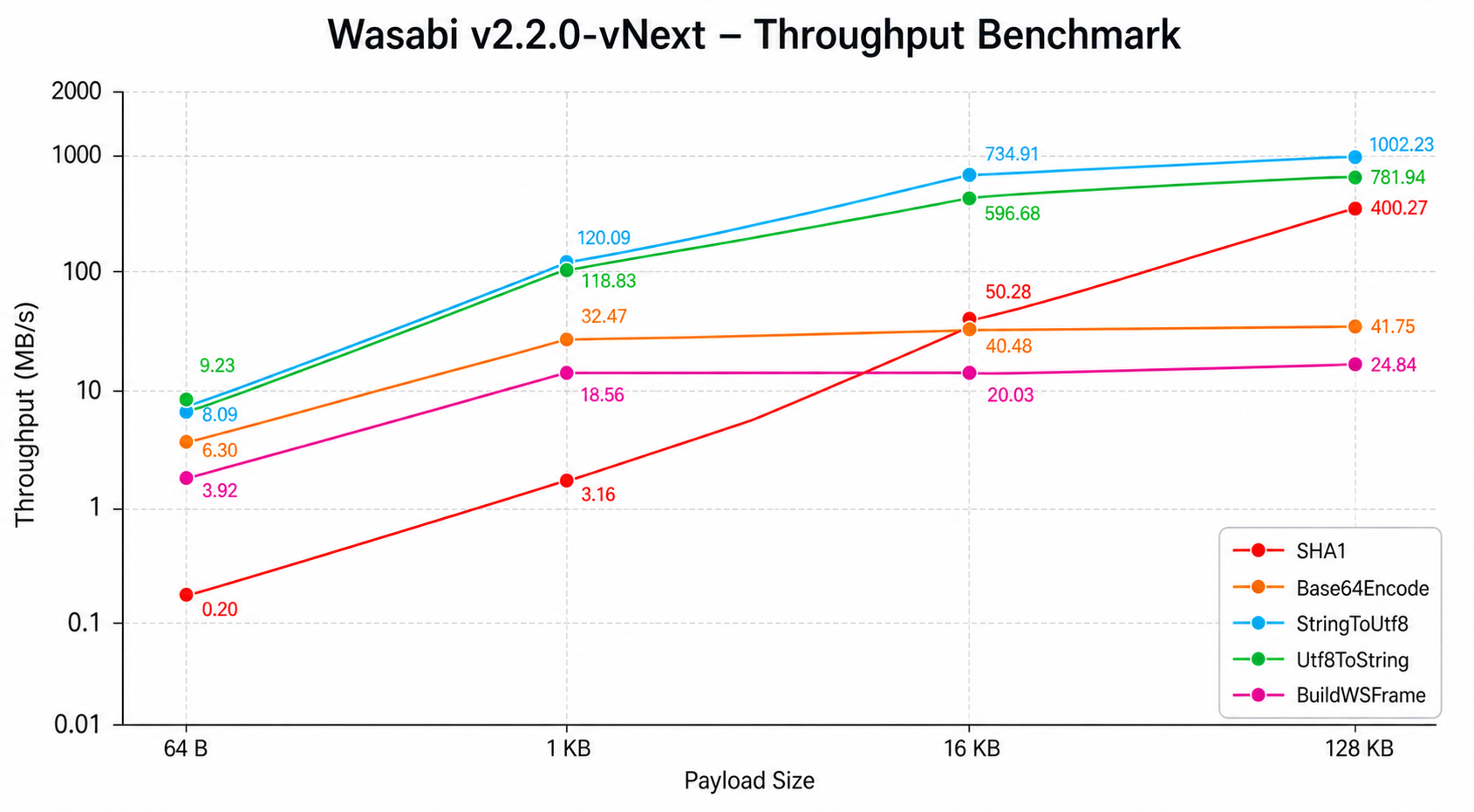
[!NOTE] SHA‑1 now runs at 400 MB/s (down from 1.8 s per 128 KB in pure VBA). Base64 operations stay around 41 MB/s, UTF‑8 conversion exceeds 1 GB/s, and WebSocket frame construction tops 25 MB/s.
The test harness and raw data are in
benchmark/.
Compatibility
Wasabi was designed to run without any external dependencies, using exclusively
native Windows DLLs that ship with every version of Windows. No references need
to be enabled in Tools → References, no COM components need to be registered,
and no third-party installers are required. Dropping the .bas file into a VBA
project is all it takes.
Operating System
| Version | Support |
|---|---|
| Windows XP |
✅ |
| Windows Vista |
✅ |
| Windows 7 |
✅ |
| Windows 8 / 8.1 |
✅ |
| Windows 10 |
✅ |
| Windows 11 |
✅ |
Wasabi relies on ws2_32.dll, secur32.dll, kernel32.dll, advapi32.dll, and crypt32.dll. These libraries are present in every version of Windows since XP, which is why Wasabi runs on machines over 20 years old without modifications.
This is a deliberate architectural choice. Many competing modules depend on the WinHttpWebSocket* family of functions (WinHttpWebSocketSend, WinHttpWebSocketReceive, WinHttpWebSocketCompleteUpgrade) introduced only in Windows 8. As a result, those modules silently fail on Windows 7 machines, which remain common in corporate and industrial environments. Wasabi has no such limitation.
Office and VBA
| Environment | Support |
|---|---|
| Excel 32-bit |
✅ |
| Excel 64-bit |
✅ |
| Word 32-bit |
✅ |
| Word 64-bit |
✅ |
| PowerPoint 32-bit |
✅ |
| PowerPoint 64-bit |
✅ |
| Access 32-bit |
✅ |
| Access 64-bit |
✅ |
 Any VBA7 host (Office 2010+) Any VBA7 host (Office 2010+) |
✅ |
 VBA6 (Office 2007 and earlier) VBA6 (Office 2007 and earlier) |
✅ |
The transition from 32-bit to 64-bit Office broke many VBA modules that used native API declarations. Wasabi handles this transparently through conditional compilation.
Every API declaration uses #If VBA7 to switch between Long (32-bit) and
LongPtr/PtrSafe (64-bit). The same .bas file works correctly on Office
2007 32-bit and Office 365 64-bit on Windows 11.
32-bit and 64-bit compatibility is guaranteed through conditional compilation (
#If VBA7) across all API declarations.
Native DLLs
| Library | Role in Wasabi | Optional |
|---|---|---|
ws2_32.dll |
TCP socket creation, DNS, send/recv | No |
secur32.dll |
TLS 1.2/1.3 via Schannel SSPI | No |
kernel32.dll |
Memory operations, UTF-8, tick count | No |
advapi32.dll |
Cryptographic random numbers (CryptGenRandom) |
No |
crypt32.dll |
Certificate store, chain validation | No |
zlib1.dll |
Compression for permessage-deflate |
Yes |
What does “zero external dependencies” mean in practice?
Wasabi requires nothing beyond Windows and the standard VBA runtime. There is no installer, no COM registration, no ActiveX control, no third-party DLL, no Python runtime, no .NET package, and no regsvr32.
The only optional component is zlib1.dll, needed strictly if you enable permessage-deflate. The module detects its presence automatically and works perfectly without it. This is highly beneficial in corporate environments where IT policies prevent software installation. You can distribute a workbook containing Wasabi without asking the user to install anything first.
Compression (permessage-deflate)
Wasabi supports the WebSocket permessage-deflate extension (RFC 7692), which
compresses message payloads to reduce bandwidth usage.
- Compression is opt-in on a per‑connection basis
- Requires
zlib1.dll(see Native DLLs and DEFLATE.md) - Automatically negotiates with the server during handshake
- Falls back gracefully if the server doesn’t support compression or the DLL is missing
' Connect with compression enabled
If WebSocketConnect("wss://example.com/ws", h, True, True) Then
    Debug.Print "Compression active:", WebSocketGetDeflateEnabled(h)
End If
[!NOTE]
permessage-deflatereduces bandwidth, not latency. It’s most beneficial for large payloads or connections with limited bandwidth. For small messages, the CPU overhead may slightly outweigh the bandwidth savings.
Execution Model: Single-Thread and Polling
VBA is single-threaded. One execution thread is shared between your code and the Office interface, so there is no native background socket listening.
Wasabi uses a polling model: incoming messages accumulate in internal buffers
and are delivered when you call WebSocketReceive.
Each WebSocketReceive call:
- Runs maintenance (pings, inactivity timeout, MTU probes)
- Checks the OS socket buffer (
FIONREAD) - Reads available data
- Decrypts (if TLS) and parses WebSocket frames
- Returns the oldest queued message
Between calls, the socket stays open and the kernel buffers incoming data. No messages are lost.
- Not slow. The ring buffer holds up to 512 messages.
- Connection doesn’t drop. The socket stays active regardless of polling frequency.
- No infinite loop required. Simple send/receive/disconnect workflows work fine.
Research & Architecture
The research/ directory contains detailed design notes, investigation logs, and reference materials for every major subsystem in Wasabi. It is intended for maintainers and advanced users who want to understand why certain decisions were made, not just what the code does. Topics include TLS verification, pointer fixes, permessage-deflate negotiations, Happy Eyeballs, MTU discovery, MQTT state logic, zero-copy buffer management, fragmentation, and VBA6 compatibility.
Acknowledgements
Wasabi was built on years of community efforts to bring real-time networking to the Office ecosystem.
- WinHttpWebSocket: First serious WebSocket attempt in VBA using native APIs.
- VbAsyncSocket: The most sophisticated VB6/VBA networking library, with native Schannel.
- VBA-Web: Standard for HTTP/REST communication in VBA.
- TlsSocketWSS: TLS WebSocket server for VB6.
- VB6-WebSocket-Server-SSL: Pure VB6 secure WebSocket server.
- VBA_WinSockAPI: Educational Winsock TCP client/server in VBA.
These projects shaped every architectural decision in Wasabi: the non-blocking I/O model, manual Schannel handling, ring buffers, and auto-reconnect flows.
Contributing
Bug reports, feature requests, and pull requests are welcome. See CONTRIBUTING.md.
Security
Do not report vulnerabilities through public issues. See SECURITY.md and use GitHub Private Vulnerability Reporting.
License
MIT, free for personal and commercial use. See LICENSE.