wasabi
Wasabi Benchmark Suite
[!WARNING] These benchmark tests can only be run within the
Microsoft Excel environment.
This folder contains a self-contained benchmark harness for Wasabi’s core primitives. It measures raw CPU throughput, independent of network latency, using the same native Windows APIs that Wasabi calls internally.
What is tested
| Operation | Description |
|---|---|
| SHA‑1 | Cryptographic hash used during the WebSocket handshake (CryptoAPI) |
| Base64Encode | Encoder used for handshake keys and proxy auth (CryptBinaryToStringW) |
| StringToUtf8 | Conversion from VBA String to UTF‑8 bytes (WideCharToMultiByte) |
| Utf8ToString | Conversion from UTF‑8 bytes to VBA String (MultiByteToWideChar) |
| BuildWSFrame | Full WebSocket frame construction, including CryptGenRandom mask |
Prerequisites
- Wasabi.bas must be in the same VBA project.
- The 7 public wrapper functions listed at the bottom of
WasabiBenchmark.basmust be added toWasabi.bas.
How to run
- Import
WasabiBenchmark.basinto your VBA project. - Run
WasabiBenchmark_RunAllfrom the Immediate Window or Macro dialog.
Interpreting the results
- Avg Latency (µs) – average microseconds per operation.
- Throughput (MB/s) – how many megabytes per second the operation processes.
- Ops/s (k) – thousands of operations per second.
The suite uses QueryPerformanceCounter for sub‑millisecond accuracy and
automatically adapts iteration counts to the payload size.
Reference chart
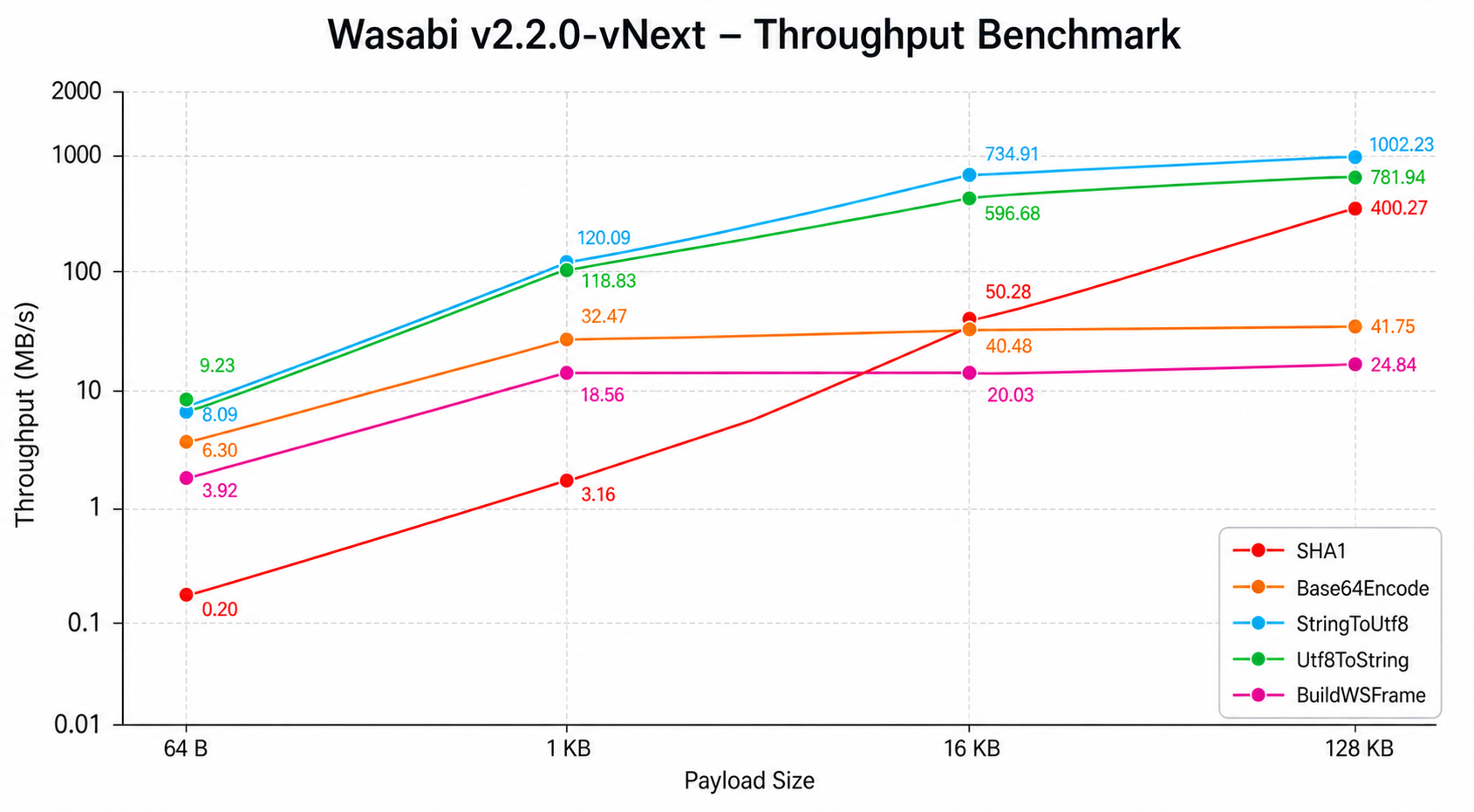
The chart plots throughput against payload size on a logarithmic scale, highlighting the performance difference between operations.